In honor of my buddy Jason's decision to run his first Dungeons & Dragons game, I present one of D&D's oldest monsters.
Say hello to the Umber Hulk:
An Umber Hulk is a powerful subterranean predator from the Dungeons and Dragons roleplaying game. Umber hulks stand at 8 feet tall and possess large mandibles and huge claws capable of burrowing through solid stone. They have four eyes. The two smaller eyes provide normal vision while the two larger ones enable the creature to see in the dark. Furthermore, anyone who looks directly into the beast's four eyes may suffer from a debilitating sense of confusion.
Umber hulks eat young purple worms, anhkhegs, and similiar creatures. However, their favorite prey are humans!
Even though the Umber Hulk is a subterranean monster, I found it very difficult to dig tunnels that were both in scale for the miniature and large enough for the camera to fit. Seeking a compromise, I found a splintered tree where the figure could stand and the base was mostly hidden. As a happy accident, it looks like the beast is tearing through whatever hasty barricades the players have erected.
In Photoshop, I tried to create an HDR effect out of a single exposure and tweaked the saturation a little bit. I added the black "widescreen" lines primarily to hide the figure's base. That they look cool with the HDR is an added bonus.
I have a +5 bonus to my EXIF save:
| Camera: | Canon EOS Digital Rebel XTi |
| Exposure: | 0.01 sec (1/100) |
| Aperture: | f/11.0 |
| Focal Length: | 55 mm |
| ISO Speed: | 400 |
| Exposure Bias: | 0 EV |
| Flash: | Off |
| File Size: | 5.5 MB |
| File Type: | JPEG |
| MIME Type: | image/jpeg |
| Image Width: | 3888 |
| Image Height: | 2592 |
| Encoding Process: | Baseline DCT, Huffman coding |
| Bits Per Sample: | 8 |
| Color Components: | 3 |
| X-Resolution: | 72 dpi |
| Y-Resolution: | 72 dpi |
| Orientation: | Horizontal (normal) |
| Software: | Adobe Photoshop CS3 Windows |
| Date and Time (Modified): | 2009:02:25 22:38:28 |
| YCbCr Positioning: | Co-sited |
| Exposure Program: | Aperture-priority AE |
| Date and Time (Original): | 2009:02:25 14:23:33-06:00 |
| Date and Time (Digitized): | 2009:02:25 14:23:33 |
| Metering Mode: | Multi-segment |
| Color Space: | sRGB |
| Focal Plane X-Resolution: | 4433.29532497149 dpi |
| Focal Plane Y-Resolution: | 4453.60824742268 dpi |
| Custom Rendered: | Normal |
| Exposure Mode: | Auto |
| White Balance: | Auto |
| Scene Capture Type: | Standard |
| Compression: | JPEG (old-style) |
| Global Angle: | 30 |
| Global Altitude: | 30 |
| Copyright Flag: | False |
| Photoshop Quality: | 12 |
| Photoshop Format: | Standard |
| Progressive Scans: | 3 Scans |
| XMPToolkit: | Adobe XMP Core 4.1-c036 46.276720, Mon Feb 19 2007 22:40:08 |
| Orientation: | Horizontal (normal) |
| Metadata Date: | 2009:02:25 22:38:28-06:00 |
| Creator Tool: | Adobe Photoshop CS3 Windows |
| Format: | image/jpeg |
| Color Mode: | 3 |
| ICCProfile Name: | sRGB IEC61966-2.1 |
| Viewing Conditions Illuminant Type: | D50 |
| Measurement Observer: | CIE 1931 |
| Measurement Flare: | 0.999% |
| Measurement Illuminant: | D65 |
| Color Transform: | YCbCr |
| Flash Return: | No return detection |
| Flash Mode: | Off |
| Flash Function: | False |
| Flash Red Eye Mode: | False |
Be good,
-Dave
|


Patlabor, courtesy of Wikipedia:
Patlabor takes place in what was, at the time of release, the near future of 1998-2002. Robots called "Labors" are employed in heavy construction work. The Tokyo Metropolitan Police has its own arsenal of Patlabors to combat crimes and deal with accidents involving Labors. The story arcs usually revolve around Tokyo Metropolitan Police Special Vehicle Section 2, Division 2. Noa Izumi is the main protagonist of the series, but all of Division 2 play roles.
The feature films follow separate continuities, referred to as the "movie timeline" and the "TV timeline." The different OVA series follow either the movie or TV timelines.
The Griffon was released by Kaiyodo as part of their Revoltech line. He can be ordered from a number of online vendors or in local specialty toy shops.
This one was a happy accident. I stood the figure in a small puddle, hoping to get some reflections, but I just couldn't find an angle that made the Griffon appear tall enough and still reflect as much as I wanted. I compromised with this one and took it into Photoshop.
The first thing I did was paint his eye, then, to tie it all together, I added a Gradient Map of yellow and red running diagonally. I gotta admit that I'm really happy with how this turned out. I got a little reflection and some great light.
How to build your own combat EXIF:| Camera: | Canon EOS Digital Rebel XTi |
| Exposure: | 0.025 sec (1/40) |
| Aperture: | f/11.0 |
| Focal Length: | 50 mm |
| ISO Speed: | 400 |
| Exposure Bias: | 0 EV |
| Flash: | Off |
| File Size: | 4.2 MB |
| File Type: | JPEG |
| MIME Type: | image/jpeg |
| Image Width: | 2592 |
| Image Height: | 3888 |
| Encoding Process: | Baseline DCT, Huffman coding |
| Bits Per Sample: | 8 |
| Color Components: | 3 |
| X-Resolution: | 72 dpi |
| Y-Resolution: | 72 dpi |
| Orientation: | Horizontal (normal) |
| Software: | Adobe Photoshop CS3 Windows |
| Date and Time (Modified): | 2009:02:13 13:12:42 |
| YCbCr Positioning: | Co-sited |
| Exposure Program: | Aperture-priority AE |
| Date and Time (Original): | 2009:02:13 13:21:39-06:00 |
| Date and Time (Digitized): | 2009:02:13 13:21:39 |
| Metering Mode: | Multi-segment |
| Color Space: | sRGB |
| Focal Plane X-Resolution: | 4433.29532497149 dpi |
| Focal Plane Y-Resolution: | 4453.60824742268 dpi |
| Custom Rendered: | Normal |
| Exposure Mode: | Auto |
| White Balance: | Manual |
| Scene Capture Type: | Standard |
| Compression: | JPEG (old-style) |
| Global Angle: | 30 |
| Global Altitude: | 30 |
| Copyright Flag: | False |
| Photoshop Quality: | 12 |
| Photoshop Format: | Standard |
| Progressive Scans: | 3 Scans |
| XMPToolkit: | Adobe XMP Core 4.1-c036 46.276720, Mon Feb 19 2007 22:40:08 |
| Orientation: | Horizontal (normal) |
| Metadata Date: | 2009:02:13 13:12:42-06:00 |
| Creator Tool: | Adobe Photoshop CS3 Windows |
| Format: | image/jpeg |
| Color Mode: | 3 |
| ICCProfile Name: | sRGB IEC61966-2.1 |
| Viewing Conditions Illuminant Type: | D50 |
| Measurement Observer: | CIE 1931 |
| Measurement Flare: | 0.999% |
| Measurement Illuminant: | D65 |
| Color Transform: | YCbCr |
| Flash Return: | No return detection |
| Flash Mode: | Off |
| Flash Function: | False |
| Flash Red Eye Mode: | False |
Be good,
-Dave
|

From Warmachine Prime:
The most recognized heavy 'jack in the Cygnaran arsenal, the Ironclad is a walking behemoth of metal nearly thrice the size of a man. Gigantic smokestacks blow sooty "breath" from its hearthfire furnace, and a bright orange glow emits from its face grill, lending a fiery and fearsome gaze.
Armed with a powerful quake hammer, the Ironclad smashes lesser combatants to shrapnel with its massive blows; sometimes just one strike from this hammer has toppled even another heavy 'jack. The Ironclad's durable armor - smelted from precious ores harvested from the roots of the tallest mountains - provides fantastic protection from all but the heaviest impacts, and because of these things, the Cygnaran Ironclad is renowned for leading most warjack charges.
The Ironclad is a miniature wargaming model produced by Privateer Press for use in Warmachine. It can be ordered via the PP website or purchased in any local hobby shop.
Taking the Ironclad outside, I found a nice little divot in the ground that, once I got the figure balanced, hid both his legs and base. While this effectively cuts the figure in half, but by showing some of the ground, it gives the impression of the machine climbing an embankment, getting ready to smash you with that big hammer of his.
Cleanup in Photoshop consisted of tweaking the saturation and Lab Color, then painting the glow on his face. Finally, I used the clone stamp to create the "smoke" by cloning some of that white sky down just over the tops of the smokestacks.
Roll 2d6 and add the weapon's EXIF:
| Camera: | Canon EOS Digital Rebel XTi |
| Exposure: | 0.025 sec (1/40) |
| Aperture: | f/11.0 |
| Focal Length: | 50 mm |
| ISO Speed: | 400 |
| Exposure Bias: | 0 EV |
| Flash: | Off |
| File Size: | 4.0 MB |
| File Type: | JPEG |
| MIME Type: | image/jpeg |
| Image Width: | 2592 |
| Image Height: | 3528 |
| Encoding Process: | Baseline DCT, Huffman coding |
| Bits Per Sample: | 8 |
| Color Components: | 3 |
| X-Resolution: | 72 dpi |
| Y-Resolution: | 72 dpi |
| Orientation: | Horizontal (normal) |
| Software: | Adobe Photoshop CS3 Windows |
| Date and Time (Modified): | 2009:02:13 13:24:59 |
| YCbCr Positioning: | Co-sited |
| Exposure Program: | Aperture-priority AE |
| Date and Time (Original): | 2009:02:13 13:28:13-06:00 |
| Date and Time (Digitized): | 2009:02:13 13:28:13 |
| Metering Mode: | Multi-segment |
| Color Space: | sRGB |
| Focal Plane X-Resolution: | 4433.29532497149 dpi |
| Focal Plane Y-Resolution: | 4453.60824742268 dpi |
| Custom Rendered: | Normal |
| Exposure Mode: | Auto |
| White Balance: | Manual |
| Scene Capture Type: | Standard |
| Compression: | JPEG (old-style) |
| Global Angle: | 30 |
| Global Altitude: | 30 |
| Copyright Flag: | False |
| Photoshop Quality: | 12 |
| Photoshop Format: | Standard |
| Progressive Scans: | 3 Scans |
| XMPToolkit: | Adobe XMP Core 4.1-c036 46.276720, Mon Feb 19 2007 22:40:08 |
| Orientation: | Horizontal (normal) |
| Metadata Date: | 2009:02:13 13:24:59-06:00 |
| Creator Tool: | Adobe Photoshop CS3 Windows |
| Format: | image/jpeg |
| Color Mode: | 3 |
| ICCProfile Name: | sRGB IEC61966-2.1 |
| Viewing Conditions Illuminant Type: | D50 |
| Measurement Observer: | CIE 1931 |
| Measurement Flare: | 0.999% |
| Measurement Illuminant: | D65 |
| Color Transform: | YCbCr |
| Flash Return: | No return detection |
| Flash Mode: | Off |
| Flash Function: | False |
| Flash Red Eye Mode: | False |
Be good,
-Dave
|

"I crush your head!"
Marcus Fenix was produced by NECA Toys. Bio from Gearspedia:
Marcus Fenix serves in the military of the Coalition of Ordered Governments, and is the main protagonist of Gears of War and of the sequel Gears of War 2.
Few have given more and lost as much as Marcus. A promising soldier during the Pendulum Wars, he saw everything change on Emergence Day. Marcus bravely fought the Locust for ten years, then, during an intense battle, he abandoned his post to rescue his father, Professor Adam Fenix. But he was too late. Marcus was tried for dereliction of duty and sentence to 40 years in Jacinto Maximum Security Prison. Incarcerated for four years before being released to fight Locust again, Marcus was later promoted to sergeant. Along with the rest of Delta Squad, he won a battle for humanity by detonating the Lightmass bomb and destroying much of the Locust Hollow. With his reputation restored, Marcus now focuses on finishing the war against the Locust, and helping his friend Dom on his own personal mission.
What looks like a rocky crag is actually a jagged tree stump where the tree had snapped in half. Just stand the figure in there, pose appropriately, and snap the shot.
In Photoshop, I ran a little Urban Acid, then desaturated slightly.
Welcome back to the EXIF, soldier.
| Camera: | Canon EOS Digital Rebel XTi |
| Exposure: | 0.001 sec (1/800) |
| Aperture: | f/2.5 |
| Focal Length: | 50 mm |
| ISO Speed: | 400 |
| Exposure Bias: | 0 EV |
| Flash: | Off |
| File Size: | 5.1 MB |
| File Type: | JPEG |
| MIME Type: | image/jpeg |
| Image Width: | 2592 |
| Image Height: | 3888 |
| Encoding Process: | Baseline DCT, Huffman coding |
| Bits Per Sample: | 8 |
| Color Components: | 3 |
| X-Resolution: | 72 dpi |
| Y-Resolution: | 72 dpi |
| Orientation: | Horizontal (normal) |
| Software: | Adobe Photoshop CS3 Windows |
| Date and Time (Modified): | 2009:02:13 13:08:21 |
| YCbCr Positioning: | Co-sited |
| Exposure Program: | Aperture-priority AE |
| Date and Time (Original): | 2009:02:13 13:17:49-06:00 |
| Date and Time (Digitized): | 2009:02:13 13:17:49 |
| Metering Mode: | Multi-segment |
| Color Space: | sRGB |
| Focal Plane X-Resolution: | 4433.29532497149 dpi |
| Focal Plane Y-Resolution: | 4453.60824742268 dpi |
| Custom Rendered: | Normal |
| Exposure Mode: | Auto |
| White Balance: | Manual |
| Scene Capture Type: | Standard |
| Compression: | JPEG (old-style) |
| Global Angle: | 30 |
| Global Altitude: | 30 |
| Copyright Flag: | False |
| Photoshop Quality: | 12 |
| Photoshop Format: | Standard |
| Progressive Scans: | 3 Scans |
| XMPToolkit: | Adobe XMP Core 4.1-c036 46.276720, Mon Feb 19 2007 22:40:08 |
| Orientation: | Horizontal (normal) |
| Metadata Date: | 2009:02:13 13:08:21-06:00 |
| Creator Tool: | Adobe Photoshop CS3 Windows |
| Format: | image/jpeg |
| Color Mode: | 3 |
| ICCProfile Name: | sRGB IEC61966-2.1 |
| Viewing Conditions Illuminant Type: | D50 |
| Measurement Observer: | CIE 1931 |
| Measurement Flare: | 0.999% |
| Measurement Illuminant: | D65 |
| Color Transform: | YCbCr |
| Flash Return: | No return detection |
| Flash Mode: | Off |
| Flash Function: | False |
| Flash Red Eye Mode: | False |
Be good,
-Dave
|
4:51 AM by
El Dave
, under

Have I done Wage wearing glasses? It seems like I've done this before...
Oh well.
Because there really isn't much to explain or nitty gritty to get into (I mean, let's face it, this is just Wage in glasses, staring into the camera), I thought it would be fun to play around with some of FD's Flickr Toys.


There is entirely too much EXIF in here:
| Camera: | Canon EOS Digital Rebel XTi |
| Exposure: | 0.05 sec (1/20) |
| Aperture: | f/2.5 |
| Focal Length: | 50 mm |
| ISO Speed: | 400 |
| Exposure Bias: | 0 EV |
| Flash: | Off |
| File Size: | 5.6 MB |
| File Type: | JPEG |
| MIME Type: | image/jpeg |
| Image Width: | 3888 |
| Image Height: | 2592 |
| Encoding Process: | Baseline DCT, Huffman coding |
| Bits Per Sample: | 8 |
| Color Components: | 3 |
| X-Resolution: | 72 dpi |
| Y-Resolution: | 72 dpi |
| Orientation: | Horizontal (normal) |
| Software: | Adobe Photoshop CS3 Windows |
| Date and Time (Modified): | 2009:02:14 17:27:53 |
| YCbCr Positioning: | Co-sited |
| Exposure Program: | Aperture-priority AE |
| Date and Time (Original): | 2009:02:14 18:21:06-06:00 |
| Date and Time (Digitized): | 2009:02:14 18:21:06 |
| Metering Mode: | Multi-segment |
| Color Space: | sRGB |
| Focal Plane X-Resolution: | 4433.29532497149 dpi |
| Focal Plane Y-Resolution: | 4453.60824742268 dpi |
| Custom Rendered: | Normal |
| Exposure Mode: | Auto |
| White Balance: | Manual |
| Scene Capture Type: | Standard |
| Compression: | JPEG (old-style) |
| Global Angle: | 30 |
| Global Altitude: | 30 |
| Copyright Flag: | False |
| Photoshop Quality: | 12 |
| Photoshop Format: | Standard |
| Progressive Scans: | 3 Scans |
| XMPToolkit: | Adobe XMP Core 4.1-c036 46.276720, Mon Feb 19 2007 22:40:08 |
| Orientation: | Horizontal (normal) |
| Metadata Date: | 2009:02:14 17:27:53-06:00 |
| Creator Tool: | Adobe Photoshop CS3 Windows |
| Format: | image/jpeg |
| Color Mode: | 3 |
| ICCProfile Name: | sRGB IEC61966-2.1 |
| Viewing Conditions Illuminant Type: | D50 |
| Measurement Observer: | CIE 1931 |
| Measurement Flare: | 0.999% |
| Measurement Illuminant: | D65 |
| Color Transform: | YCbCr |
| Flash Return: | No return detection |
| Flash Mode: | Off |
| Flash Function: | False |
| Flash Red Eye Mode: | False |
Be good,
-Dave
|

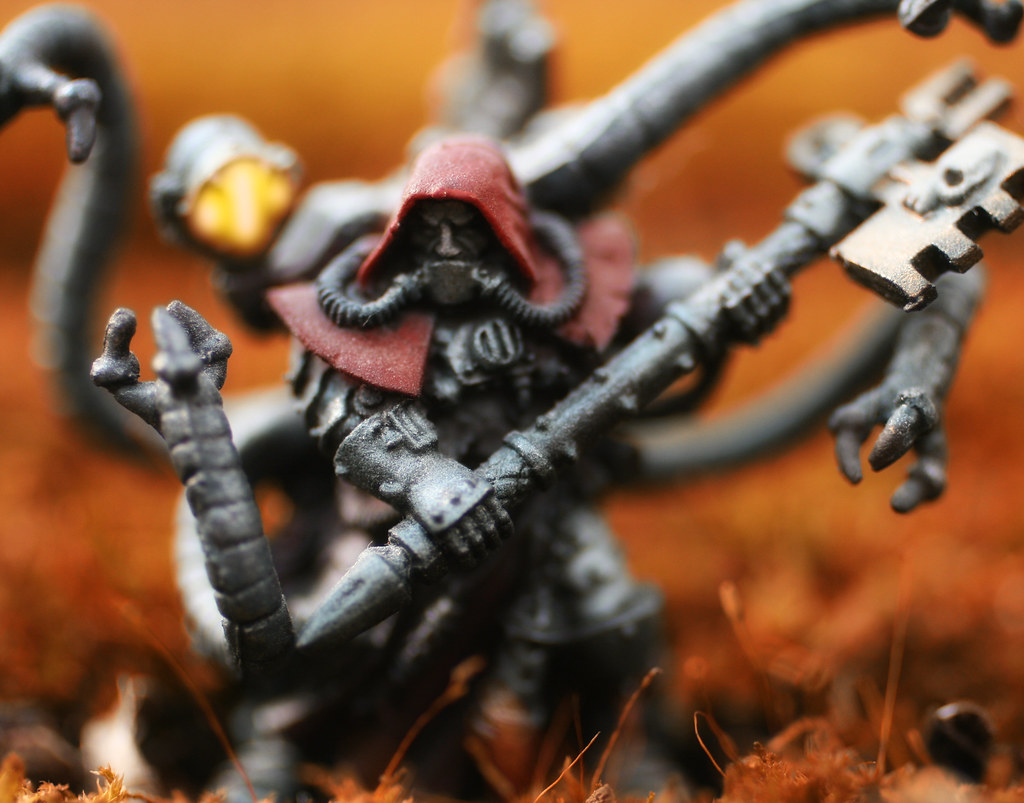
One could be forgiven for assuming I have an unhealthy fixation on the Adeptus Mechanicus. There is just something about a cyborg monk that sets me all a'flutter, and this particular 32mm model hits all the right notes. I added the little arms, aka mechadendrites, taken from a Dr. Octopus Heroclix figure. I actually need another Doc Ock just so I can make a mold of the arms to use in future projects!
In setting up this shot, I pictured the Tech Priest as an Explorator, leading exhibitions out into the galactic fringes in search of lost knowledge.
These members of the Cult Mechanicus were something of a breed apart from their kin. Any Techpriest was free to join their ranks where they undertook to complete the Quest for Knowledge across the stars in order to seek out undiscovered data, chart uncatalogued phenomena, find forgotten archeotech and learn of new unknown forms of life. As such, research stations, explorer vessels and any outpost of any distance from a Forge World are likely to be manned by Explorators of the Adeptus Mechanicus. Their brethren would call them foolish for their actions though they consider themselves as intrepid adventurers that explore the unknown reaches of the galaxy.
The exploits of successful Explorators are known to found many great prizes that have enhanced the Quest for Knowledge though many others have met grisly deaths in the hostile galaxy. In some cases, the actions of an Explorator have unleashed cataclysmic horrors on Mankind due to their ill-conceived prying though such events are rare.
An Explorator will not be visibly different from a fellow Techpriest though they will be a senior official within a warband.
I love the idea that the guys trying to learn how to save human kind are sometimes the ones who destroy entire chunks of it.
For this shot, I found a mossy tree stump that was flat enough for the Explorator to stand on (his feet are tiny). I tried several different zooms, some where it was just him and a vast expanse of moss and some, like this, that were up close and you can see the cool details of the plant. The pulled back zoom looked pretty good, but, because the model is only head and shoulders taller than a US Quarter, I lost the details of the figure. Maybe next time I'll post both versions.
Taking him into Photoshop, I first did a little selective coloring on the moss to make it a more rusty orange (to better suit the whole machine motif), then painted the spotlight the same way I do robot eyes. Finally, I felt that his robe was a little flat. There have been many complaints about how I paint my miniatures; the most common being that they are too dark or that everything is brown. Because of this, I went back and painted over his robe with a little red, set to Overlay, which really made the guy pop.
EXIF for the EXIF God:
| Camera: | Canon EOS Digital Rebel XTi |
| Exposure: | 0.002 sec (1/500) |
| Aperture: | f/2.5 |
| Focal Length: | 50 mm |
| ISO Speed: | 400 |
| Exposure Bias: | 0 EV |
| Flash: | Off |
| File Size: | 3.6 MB |
| File Type: | JPEG |
| MIME Type: | image/jpeg |
| Image Width: | 3306 |
| Image Height: | 2592 |
| Encoding Process: | Baseline DCT, Huffman coding |
| Bits Per Sample: | 8 |
| Color Components: | 3 |
| X-Resolution: | 72 dpi |
| Y-Resolution: | 72 dpi |
| Orientation: | Horizontal (normal) |
| Software: | Adobe Photoshop CS3 Windows |
| Date and Time (Modified): | 2009:02:13 13:36:56 |
| YCbCr Positioning: | Co-sited |
| Exposure Program: | Aperture-priority AE |
| Date and Time (Original): | 2009:02:13 13:16:03-06:00 |
| Date and Time (Digitized): | 2009:02:13 13:16:03 |
| Metering Mode: | Multi-segment |
| Color Space: | sRGB |
| Focal Plane X-Resolution: | 4433.29532497149 dpi |
| Focal Plane Y-Resolution: | 4453.60824742268 dpi |
| Custom Rendered: | Normal |
| Exposure Mode: | Auto |
| White Balance: | Manual |
| Scene Capture Type: | Standard |
| Compression: | JPEG (old-style) |
| Global Angle: | 30 |
| Global Altitude: | 30 |
| Copyright Flag: | False |
| Photoshop Quality: | 12 |
| Photoshop Format: | Standard |
| Progressive Scans: | 3 Scans |
| XMPToolkit: | Adobe XMP Core 4.1-c036 46.276720, Mon Feb 19 2007 22:40:08 |
| Orientation: | Horizontal (normal) |
| Metadata Date: | 2009:02:13 13:36:56-06:00 |
| Creator Tool: | Adobe Photoshop CS3 Windows |
| Format: | image/jpeg |
| Color Mode: | 3 |
| ICCProfile Name: | sRGB IEC61966-2.1 |
| Viewing Conditions Illuminant Type: | D50 |
| Measurement Observer: | CIE 1931 |
| Measurement Flare: | 0.999% |
| Measurement Illuminant: | D65 |
| Color Transform: | YCbCr |
| Flash Return: | No return detection |
| Flash Mode: | Off |
| Flash Function: | False |
| Flash Red Eye Mode: | False |
Be good,
-Dave
|

I love army building figures, especially the bad guys. They usually have cool costumes and gear. Guys like Stormtroopers, aliens, etc, and this Soldier of Ra is no exception. With a guy like this, his overly huge weapons don't seem so ridiculous. He really looks like he could whack somebody with them!
From Spawn.com:
These emissaries are created from the tears and sweat of the Sun God, serving as deadly reminders of Ra's fury and might.
Soldier of Ra is produced, of course, by McFarlane Toys, as part of Spawn Series 33: Age of Pharohs.
Ok Dave, stop looking through McFarlane's website and wishing you could buy more Halo figures. There is blogging to be done!
This is actually the final shot I have from the Arid Room in the Garfield Park Conservatory. As I've mentioned in previous posts, I love the unique shape and textures of desert plants, because they really give a completely different life to a shot. For example, if I were to take a picture of this guy standing in the grass, he would just look like a toy standing in the grass. With these unfamiliar plants, it takes away your frame of reference and you look at the whole shot differently.
In Photoshop, I've been playing with the Nik Software plugins, and the Tonal Contrast filter caught my eye. What it does is create huge contrasts that really bring out little details. While I think I overdid it and he is too contrasted, I'm pretty happy with him overall and will definitely be playing with it in the future.
Here I am, EXIF you like a hurricane:
| Camera: | Canon EOS Digital Rebel XTi |
| Exposure: | 0.167 sec (1/6) |
| Aperture: | f/5.6 |
| Focal Length: | 33 mm |
| ISO Speed: | 100 |
| Exposure Bias: | 0 EV |
| Flash: | Off |
| File Size: | 5.4 MB |
| File Type: | JPEG |
| MIME Type: | image/jpeg |
| Image Width: | 2592 |
| Image Height: | 3888 |
| Encoding Process: | Baseline DCT, Huffman coding |
| Bits Per Sample: | 8 |
| Color Components: | 3 |
| X-Resolution: | 72 dpi |
| Y-Resolution: | 72 dpi |
| Orientation: | Horizontal (normal) |
| Software: | Adobe Photoshop CS3 Windows |
| Date and Time (Modified): | 2008:12:29 09:11:26 |
| YCbCr Positioning: | Co-sited |
| Exposure Program: | Aperture-priority AE |
| Date and Time (Original): | 2008:12:28 16:09:29-06:00 |
| Date and Time (Digitized): | 2008:12:28 16:09:29 |
| Metering Mode: | Multi-segment |
| Color Space: | sRGB |
| Focal Plane X-Resolution: | 4433.29532497149 dpi |
| Focal Plane Y-Resolution: | 4453.60824742268 dpi |
| Custom Rendered: | Normal |
| Exposure Mode: | Auto |
| White Balance: | Auto |
| Scene Capture Type: | Standard |
| Compression: | JPEG (old-style) |
| Global Angle: | 30 |
| Global Altitude: | 30 |
| Copyright Flag: | False |
| Photoshop Quality: | 12 |
| Photoshop Format: | Optimised |
| Progressive Scans: | 3 Scans |
| XMPToolkit: | Adobe XMP Core 4.1-c036 46.276720, Mon Feb 19 2007 22:40:08 |
| Orientation: | Horizontal (normal) |
| Metadata Date: | 2008:12:29 09:11:26-06:00 |
| Creator Tool: | Adobe Photoshop CS3 Windows |
| Format: | image/jpeg |
| Color Mode: | 3 |
| ICCProfile Name: | sRGB IEC61966-2.1 |
| Viewing Conditions Illuminant Type: | D50 |
| Measurement Observer: | CIE 1931 |
| Measurement Flare: | 0.999% |
| Measurement Illuminant: | D65 |
| Color Transform: | YCbCr |
| Flash Return: | No return detection |
| Flash Mode: | Off |
| Flash Function: | False |
| Flash Red Eye Mode: | False |
Be good,
-Dave
|